The problem
Symptom. A lidding line rejects a printed tray run because ink sits 1.2 mm inside the 4 mm seal band on one edge, while the printer insists the artwork was approved to the cold sheet drawing.
What it costs. A 220 000-pack batch is held because ink in the seal land weakens the bond, and the printer, former and packer each blame a different stage of the print-to-form sequence.
This guide shows how to compute thermal expansion of the printed web, set registration and jaw clearance, and write a print clause into the tray drawing.
- 1. Ink in the seal band is an expansion fault, not a print fault
- 2. Compute the web growth before re-registering the artwork
- 3. Registration, jaw clearance and seal band to specify
- 4. Variables that drift the print after a reel or oven change
- 5. A print-registration clause for the tray drawing
- 6. Costing shrink-compensated artwork against a held pack batch
Ink in the seal band is an expansion fault, not a print fault
Printed PET expands in the forming oven. A 300 mm web heated from 23 °C to 123 °C grows by 0.00007 × 300 × 100 = 2.1 mm, so artwork referenced to the cold sheet lands about 2 mm off the formed datum.
| What the packer sees | What is physically happening | First measurement |
|---|---|---|
| Ink inside the seal band on one edge | Web expanded and the print shifted to the datum | Print offset against the datum mark at five points |
| Band narrow on the opposite edge | Whole web displaced, not a local print fault | Ink clearance on all four edges |
| Drift grows through the reel | Oven temperature or slip changed mid-run | Offset at reel start, middle and end |
| Good cold, bad after forming | Artwork referenced to the unheated sheet | Drift before and after the forming oven |
Table 1 - Classifying a registration fault before changing platen heat
Need a fixed price for this formed tray?
Send the tray drawing, sheet gauge and annual volume. We will review draft, trim and material, then quote a production tool with a written line-acceptance test.
Get a thermoforming quotationEmail [email protected]WhatsApp
Compute the web growth before re-registering the artwork
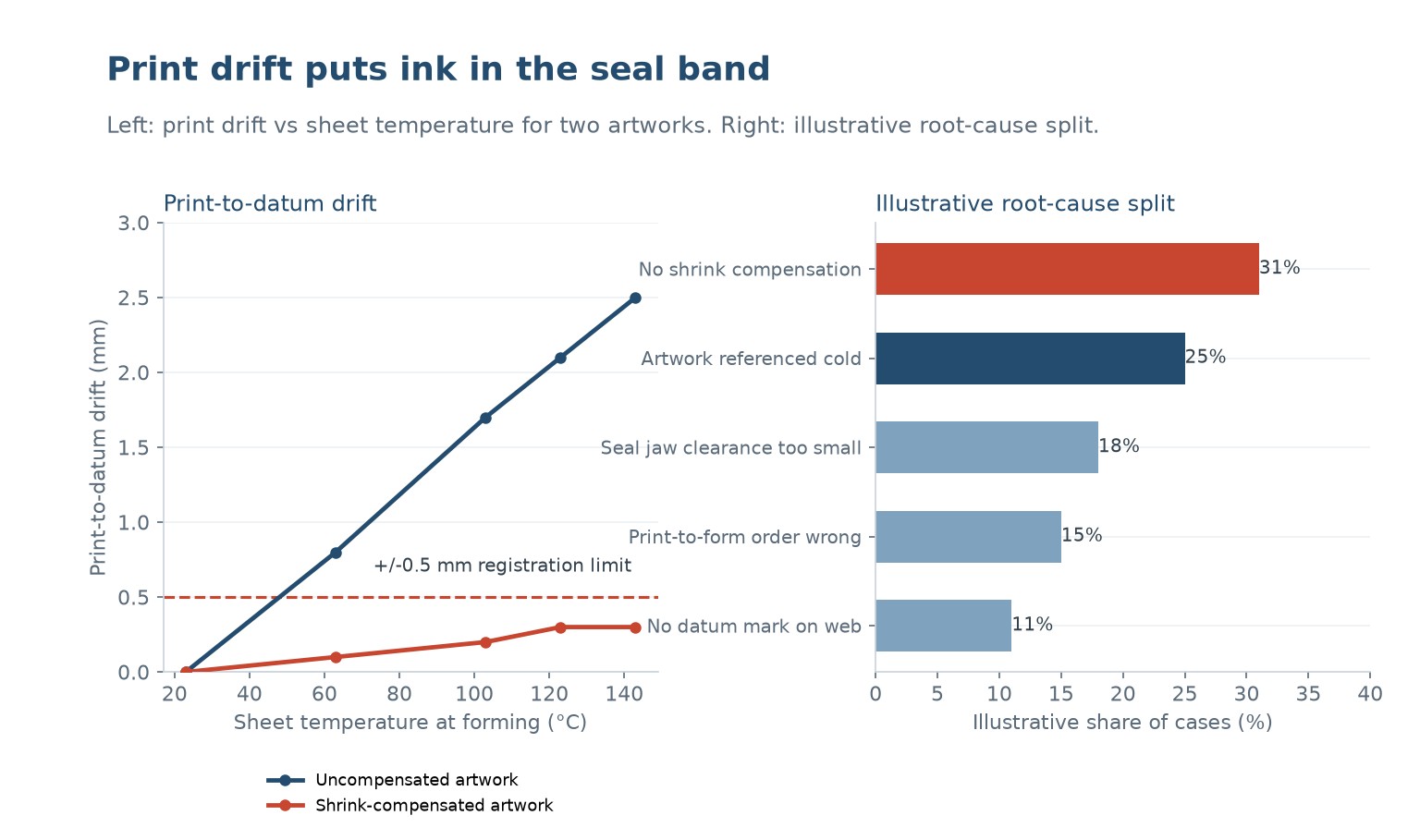
Measure print-to-datum drift at five points across the formed web and read the narrowest ink clearance. A representative uncompensated run drifted 2.1 mm at 123 °C and put ink 1.2 mm into the 4 mm seal band.
A five-step diagnostic sequence
- Mark a datum.
Print a registration datum mark on the web and reference the artwork to it. - Compute the growth.
Use 0.00007 × 300 × 100 = 2.1 mm for the 23 °C to 123 °C oven rise. - Compensate the artwork.
Pre-shrink the print by the computed 2.1 mm across the 300 mm width. - Measure four edges.
Read ink clearance on all four edges of 30 formed trays under D65 light. - Qualify three lots.
Repeat on 200 packs from three print lots and attach the record to first-off.
The chart below is a typical result from that measurement step. Use it to separate a design limit from a setting that can still be recovered.
Registration, jaw clearance and seal band to specify
Three numbers hold the band: registration within +/- 0.5 mm of a printed datum, a 1.5 mm ink-free seal band, and 1.0 mm seal-jaw clearance. Shrink-compensated artwork holds drift to 0.3 mm at 123 °C.
| Parametr | Typical target | What goes wrong outside it |
|---|---|---|
| Print registration to datum | +/- 0.5 mm | A 2.1 mm drift puts ink in the seal band |
| Ink-free seal band | ≥ 1.5 mm on all four edges | Ink in the land weakens the lidding bond |
| Seal-jaw clearance | ≥ 1.0 mm | A tight jaw crushes the printed land |
| Artwork compensation | 2.1 mm at 300 mm / 100 °C | Uncompensated artwork lands off the formed datum |
Table 2 - Registration parameters to write on the tray drawing
Variables that drift the print after a reel or oven change
Drift returns as the sequence changes. Printing before the sheet is dried, an oven 20 °C hotter, a reel with 3 % different slip, or forming before an anneal step all move the ink relative to the formed flange.
| Process variable | Effect on registration | Practical control |
|---|---|---|
| Oven 20 °C hotter | Web grows and the print drifts further | Hold oven temperature and log per shift |
| Artwork referenced to cold sheet | 2.1 mm of growth lands in the seal band | Apply shrink compensation to the artwork |
| Print-to-form order changed | Ink cures or the sheet relaxes differently | Lock the sequence in the process sheet |
| Reel with 3 % different slip | Index pitch no longer matches the print | Re-set registration per incoming print lot |
Table 3 - Variables that drift the print after sign-off
A print-registration clause for the tray drawing
A peel test cannot see where the ink sits. Add a clause: registration within +/- 0.5 mm of the printed datum, a 1.5 mm ink-free seal band on all four edges, verified on 200 packs from three print lots.
Want the tray checked against your line?
Send us the tray drawing and the line conditions. We will flag the geometry and material choices that cause jams, and quote a tool with an acceptance test.
What to send us
- Tray drawing with draft and radii
- Sheet grade and gauge
- Stack depth and line speed
- Drawings of the magazine or denester
Costing shrink-compensated artwork against a held pack batch
Shrink-compensated artwork, a printed datum mark and a 1.0 mm jaw clearance cost roughly £1 500-3 000 but hold the 1.5 mm band. One held 220 000-pack batch costs more than the artwork across the order.
Before you sign off this thermoformed tool
- A registration tolerance of +/- 0.5 mm to a printed datum is stated on the tray drawing
- A minimum 1.5 mm ink-free seal band on all four edges is written into acceptance
- A 1.0 mm seal-jaw clearance and the print-to-form sequence are specified
- Artwork carries shrink compensation for the 2.1 mm oven growth
- The print test covers 200 packs from three print lots, not a single first-off tray
A tray that looks right in the carton can still stop a filling line. Test the stack, not a single part.
Why does ink land in the seal band?
The printed web expands in the oven. A 300 mm width heated from 23 °C to 123 °C grows by 0.00007 × 300 × 100 = 2.1 mm, so artwork drawn to the cold sheet shifts into the seal land after forming.
Is the printer or the former at fault?
Measure drift before and after the oven. A 2.1 mm shift that appears only after heating is expansion, not a print error. Compensate the artwork rather than re-registering the press.
Will a wider seal band help?
It gives the ink more room but consumes printable area and does not fix the drift. Hold the +/- 0.5 mm registration and the 1.5 mm ink-free band on a 4 mm land instead.
How is shrink compensation calculated?
Multiply the web width, the coefficient 0.00007 /°C and the oven temperature rise. For 300 mm and a 100 °C rise the compensation is 2.1 mm, which holds drift near 0.3 mm.
Does the print-to-form order matter?
Yes. Print, dry and anneal the sheet before forming, and lock that sequence in the process sheet. Printing on a wet sheet or forming before an anneal step moves the ink relative to the flange.
What should the print clause say?
Registration within +/- 0.5 mm of a printed datum and a 1.5 mm ink-free seal band on all four edges, verified on 200 packs from three print lots, with the compensation value on the drawing.
Get a tray that runs on your filling line
Send us the tray drawing or a sample stack. We will review draft, trim and material, then quote a production tool with a measurable line-acceptance test written into it.
To get an accurate quote, send:
- Tray drawing or sample stack
- Sheet material and gauge
- Line speed and denesting method
- Annual volume and target unit price
Request a tool and tray quotation
Why buyers work with Uplastech
ISO 9001, ISO 14001 and ISO 45001 certified. Founded in 2016, with injection moulding lines in Shanghai and an extrusion plant in Jiangsu. Moulding machines from 90T to 1100T and a maximum shot weight of 5100 g. Samples and a written quotation are available on request.






 PL
 EN
 ES
 FR
 DE
 PT
 AR
 RU
 JA
 KO
 IT
 NL
 TR
 ID